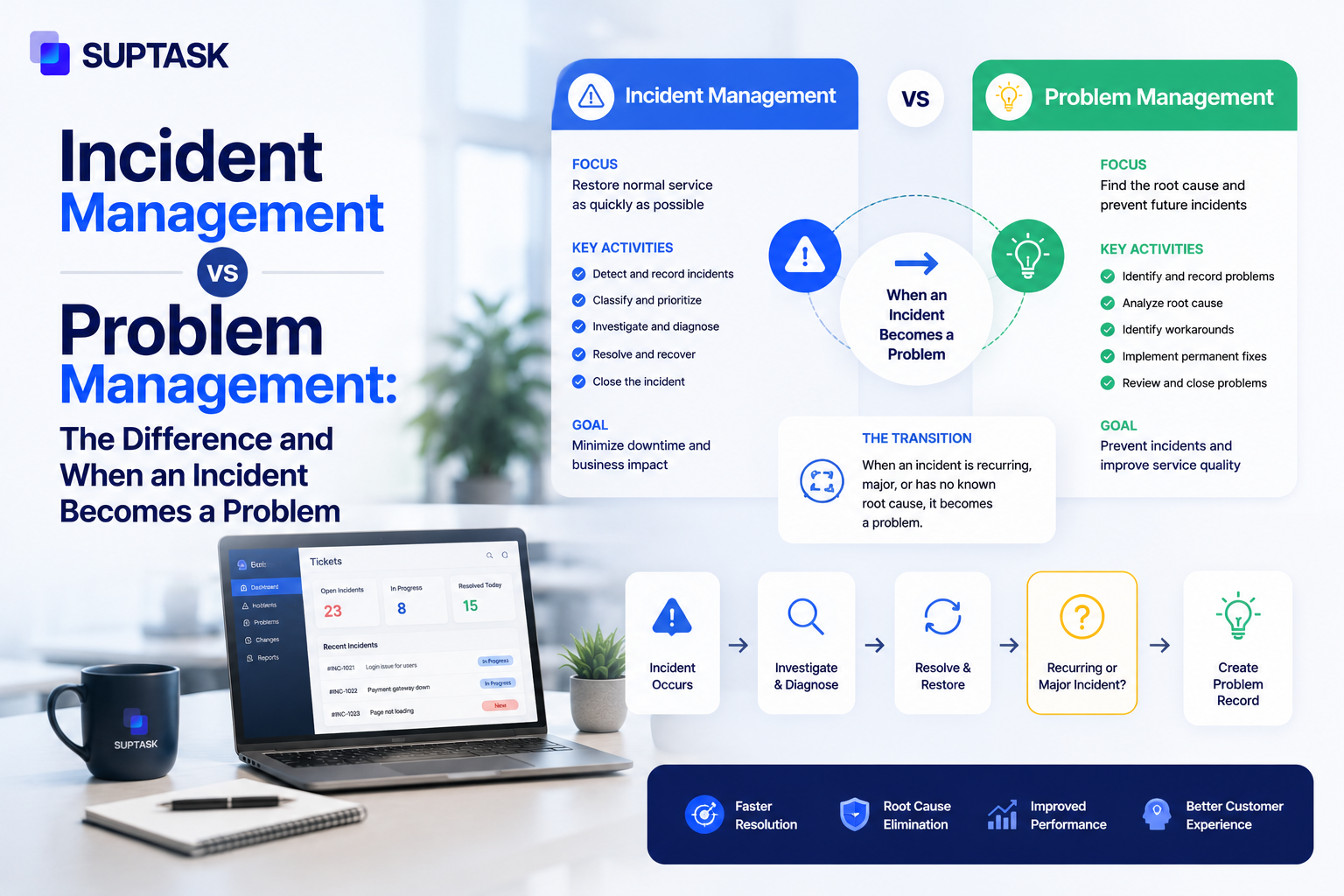
The service desk gets both of these in the same queue. An incident and a problem come in looking similar. Someone reports something isn't working, and a ticket gets opened. The difference between incident management vs problem management is in what each one is trying to finish, and the timelines they run on are not the same at all.
An incident is an unplanned interruption to an IT service. A problem is the cause behind one or more incidents, or the possible cause of them. Incident management is measured by how fast the service comes back. Problem management is the slower one, it goes after the root cause so the same failure does not keep coming back.
ITIL 4 has kept both of them as separate practices, although you can run them together. The incidents you get will keep showing you where the problems are, and once a problem is fixed properly, the incidents that were coming out of it stop.
Most teams have the first part working and not the second one. It is why the same failure keeps coming back every quarter.
So in this guide you will find the ITIL difference between the two, and the point where an incident should be turned into a problem ticket. Change management and event management are also covered, because both feed the same workflow. Then there is the practical side of it, which is how problem management can be run without it becoming just paperwork.
Incident vs Problem: The Key Differences
Incident management restores service fast. Problem management finds the root cause so the outage doesn't repeat. Everything after that, the timeline, who does the work, what has to be true before the ticket can be closed, follows from those two aims.
In summary, incident management is the firefighting part of the job. While problem management is the one where someone has to work out why the fires keep starting, and it does nothing for the outage you have open right now.
What is Incident Management?
ITIL 4 says an incident is an unplanned interruption to a service, or a reduction in the quality of services. A service might be running but at half of its expected speed is also an incident, and your user will log it as one.
The objective of incident management is restoring service so people can work again. Incident management goes through a set of stages: identification, logging, categorization, prioritization, diagnosis, resolution, and closure. This whole process is known as the incident management lifecycle, with an owner and timing rules assigned on each stage.
In the problem management vs incident management ITIL split, all of the time pressure sits on this side, which is why MTTR and the SLA clock are the numbers people watch here.
What is problem management?
Problem management is the practice of identifying the root cause of why the incident happened at all. ITIL 4 defines a problem as a cause, or potential cause, of one or more incidents. s.
The objective of problem management is not just restoration, the root cause of it must be found and fixed to avoid recurrence of such issues. In the ITIL incident vs problem management pairing, this is the one that can be given more time.
Problem management can be followed in two ways. The first one is reactive, which means an incident has already happened, or a few of them have, and a problem record is opened for it after the fact. Most of the problem management records are reactive.
The second one is proactive. It triggers from monitoring data, trend reports, or from the known error records that are already there, and nobody has reported anything yet.
The process should be familiar to you if incident management is already running in your company. In ITIL, in problem management vs incident management, the stages look similar, only the middle part is where the difference exists.
The problem is identified and logged first, then categorized and prioritized. The next step is the investigation. The result of these stages is either a permanent fix or a workaround, which is documented in the known error database.
Problem management process vs incident management, the difference is in that investigation part, and that is where most of the time is spent. Root cause analysis is done at this stage. Teams use the 5 Whys or a fishbone diagram for it, these are simple enough to run, and a structured troubleshooting methodology helps to keep the investigation on track instead of everybody guessing.
At What Point Does an Incident Turn Into a Problem?
An incident turns into a problem when restoration of services stops being enough. The service might be back to normal, but the root cause is unknown, and tickets start to repeat. ITIL doesn't specify a threshold, so the trigger is something your team should define and document. So when does an incident turn into a problem? In practice, it is when any one of these is true:
- The same incident gets logged more than 3 times in a month. This is a standard convention across the teams, and you can set it for a lower number too for critical services.
- When a major incident is closed with a workaround, rather than a fix. The service might be running again, but the root cause remains untouched.
- Multiple services down due to one failure. It does not matter much how fast the individual incidents were closed, a cause with that reach needs investigating.
- If L2 or L3 had to work something out that nobody had seen before, with no known fix to follow, then there is a knowledge gap in the system. That gap is worth a problem record even when the incident closed well inside its SLA.
- Monitoring is showing a pattern and no incident has been raised from it yet. A response time that gets a little worse week on week. Or a disk which is filling up and nobody has looked at it. These become incidents eventually, and opening the problem first is the proactive side of the practice.
Once you have met any of these conditions, the problem record should be opened and linked back to the incident, or incidents.
Some organizations have the whole thing automated, so every P1 creates a problem ticket at closure, and nobody has to decide on it. For high-impact services, that is worth setting up.
Incident, Problem, Change and Event Management: How They Fit Together?
Beyond incident and problem management, ITIL 4 covers other practices too, such as event and change management.
Change management is about making a fix live in production in a controlled way. Event management is about monitoring and alerts. So incident management vs problem management vs change management is not a choice between three things, they run one after the other.
Incident vs Change Management
An incident is unplanned and needs immediate response. A change is a planned activity that has been approved by management.
These two work together at the end of an incident. When the fix is found during resolution, it still has to be applied to production properly, and a change request should be raised for that. So the incident vs problem vs change management order is incident, diagnosis, fix, then the change.
Incident vs Event Management
Event management refers to the monitoring and alerting part. Servers, applications, network devices, they all send out events, and most of these are informational, such as a backup was completed.
An event becomes an incident only when it crosses a threshold, or when a service is actually degraded. So incident management vs problem management vs event management are three different stages of the same thing. Event management feeds incident management, it is not the same practice.
Major Incident Management vs Problem Management
A severe incident is usually a P1. It must have a dedicated incident manager with a different response.
A problem is the cause under one incident, or under many of them. Major incidents and problem tickets close at different times. The major incident closes when the service is restored. The problem stays open till the cause is fixed. Most P1s do create a problem ticket at closure, but the two are not the same thing.
How the Four Practices Feed Each Other?
All four practices can be run off a single failure. An event fires, an incident is raised from it, the same incident repeats and a problem is opened, then the fix goes into production as a change. In mature ITSM teams, these are run as one workflow and not as four separate things.
A Worked Example: From Incident to Problem
An example will help to see how the two run alongside each other. Take a database query that starts timing out, which is one of the more common incident management vs problem management examples you will come across.
On Monday morning at 9:15, the monitoring picks up that response time on the checkout API has gone up, and an incident is opened for it as a P2. L1 acknowledges the ticket, and it gets routed to the L2 backend team by the service desk. They increase the query timeout, and the service is back to normal at 9:47, so the incident is closed there.
The same alert comes again on Wednesday at 2:10 PM. The same workaround is applied, and the ticket is closed at 2:34. On Friday at 11:05 AM, it comes a third time, which is now three occurrences inside seven days. The threshold has been met, so a problem ticket should be opened at this point. L3 takes it for investigation. They find that one of the tables has no index on it, and it has grown to a size where the query cannot cope anymore. The fix is to add the index. A change request is raised so it can be applied in production during the next maintenance window.
The change is deployed on the Wednesday of the week after. The problem is closed then, and there are no further incidents coming from it.
The incidents here were resolved quickly, and the problem was resolved properly. Both processes have done their job, and the repeat has stopped.
Where the Two Practices Actually Run: Slack, Teams and Shared Channels
Incident management and problem management both need cross-team collaboration. During an incident, collaboration is fast and time-bounded. A channel opens, the right people join, and once service is restored, everyone leaves.
Problem management works the other way round. It runs over days or weeks, in a postmortem document, in a review that happens every couple of weeks, in comments left on the problem ticket by whoever had the time to look at it.
Most of the work related to these practices often happens in Slack and Teams, beyond just the ticketing portals. This practice works well until the channel becomes the real record and the ticket becomes something nobody updates.
Suptask creates incident tickets in Slack straight from the thread, along with the problem tickets that follow, so nobody has to move into a separate portal and the conversation stays attached to the ticket history. Whichever incident management system you are running, the investigation and the formal record should not be in two different places.
Common Mistakes When Running Incident and Problem Management Together
A few things go wrong repeatedly when the same team is running both.
Treating Problems as Long Incidents
The problem gets handed to the same person who resolved the incident, with the same priority on it and the same clock running. That does not work very well. Problem management should have its own owner and its own timeline, and the numbers it gets judged on are different ones, so when it is run inside the incident queue it will always lose out to whatever is broken right now.
Never Opening a Problem Record
Some teams just do not open them. The incident is closed, everybody moves on, and when it happens again the same steps get worked through by somebody else. There is no record, so there is nobody who owns the investigation.
Opening Them and Not Giving Anyone the Hours
You can open as many problem records as you like. If nobody has time set aside for the investigation, they will sit in a queue and get updated once a month with nothing in the update. Problem management needs real hours in somebody's week, or it turns into paperwork.
Mixing Up a Major Incident With a Problem
A major incident is about severity. The problem is about cause. A P1 might well create a problem record at closure, but calling the P1 itself the problem means the cause never gets an investigation of its own.
Skipping the Known Error Database
Not every problem can be fixed permanently, and there are times when the workaround is all you have for a while. It should still go into the known error database, with the symptoms written next to it so it can be found. The next time that incident comes in, whoever picks it up can apply the workaround instead of working the whole thing out again from the start.
Closing the Incident and Treating the Work as Done
This one is common enough that it shows up in the reporting. The incident is marked resolved because the service came back, the problem underneath it is still open, and the dashboard says the issue has been handled. Six weeks later, it is back. If resolved incidents are the only thing being measured, then this will keep on happening, and the numbers will look fine while it does.
Frequently Asked Questions
What is the difference between an incident and a problem?
An incident is the interruption your users are reporting. A problem is whatever is causing it. You can have many incidents coming off one problem, and the incident closes once the service is back while the problem stays open until the cause has been dealt with.
How many incidents make a problem?
There is no fixed number for this in ITIL. Three occurrences in 30 days is the convention most service desks work to, and it holds up well enough for ordinary services. For anything business critical, you should set it lower, and sometimes one occurrence is enough to justify opening the record.
What are P1, P2, P3 and P4 incidents?
These are priority levels, and they come out of impact and urgency together, impact being how many people or processes are affected, and urgency being how soon it has to be dealt with. A P1 is high on both, something like a full outage on a service everybody depends on. P2 is usually a large group affected or a critical function degraded, and P3 and P4 come down from there, with a P4 being a single user with something minor. The response and resolution targets against each level come from your own SLA and get applied at the prioritization stage of the incident management lifecycle, they are not set by ITIL.
What are the 4 stages of a major incident?
ITIL does not define a fixed set of stages, but most major incident processes run through four of them. The incident is identified, then it is declared major and escalated, then comes the response itself with the communication going out while it is still running, and after that the post-incident review. The review is usually where the problem record gets raised.
What are the 5 P's of incident management?
This is not an ITIL term, and there is no agreed version of it. Some teams use People, Process, Platform, Product and Performance. Others use Prepare, Preempt, Pinpoint, Prevent and Postmortem, and there are a few more variations in circulation. The phrase is worth recognizing, but do not assume two teams mean the same thing by it.
What is the difference between a problem and a known error?
A problem is still under investigation, and the cause has not been confirmed yet. It becomes a known error once the cause is understood and a workaround has been documented, but there is still no permanent fix in place. The known error goes into the KEDB so the next incident can be resolved straight from it. The record stays there until the fix has been deployed.
Can the same person manage both incidents and problems?
In smaller teams, it is usually the same people, and that works as long as the time is protected. The difficulty is that incidents will always feel more urgent, so the problem work gets pushed to next week and then the week after. If one person is doing both, the investigation should have hours blocked out for it, or it will not happen.
Closing: Stop Fighting the Same Fires
Incident management gets you out of today's outage. Problem management is what keeps tomorrow's queue from filling up with the same one. Both are needed, and the teams that only run the first are the ones where MTTR looks good every quarter while the ticket volume never moves.
Track incidents and problems together from inside Slack, with the investigation staying attached to the ticket. Start your Suptask trial.